Requirements
Experimental Builds
Experimental Blender builds such as 5.3-alpha/beta may work, but are not officially supported, and fixing any issues related to them, will not be a priority. Still, feel free to report any issues you encounter.
Latest HyperCursor
The latest version of HyperCursor is 0.9.22+patch.1 released on October 5th, 2026 - available as a pre-release on Patreon only.
See this page to learn what's new in the latest versions, or see the changelog for the full, detailed release history.
How to Install?
Drag and Drop Installation
Blender supports drag and dropping addon .zip files (both legacy and extension addons!) from your system's filebrowser on the open Blender application to do the installation.
This is super convenient, and also works for update installations, but you should always restart Blender after updating to a new addon version.
Dropping the .zip on Blender now installs HyperCursor as an extension into the extensions/user_default folder.
Otherwise, you can also install it following the instructions in the official Blender manual.
Legacy Addon
If you still want to run it as a Legacy Addon - you can! Functionally it will be no different.
Instead of dropping the .zip on Blender, manually extract it into the scripts/addons folder.
Alternatively, when you have a previous version installed as a Legacy addon, you can use HyperCursor's internal update installer, and it will automatically install the new version as a Legacy Addon too.
Dual-Installation blocking
With extensions, it's now more easily possible to install the same extension into multiple locations at the same time.
For example, you could have the same extension in multiple different folders under the main extensions folder.
You could also have the same addon as a legacy install in scripts/addons still.
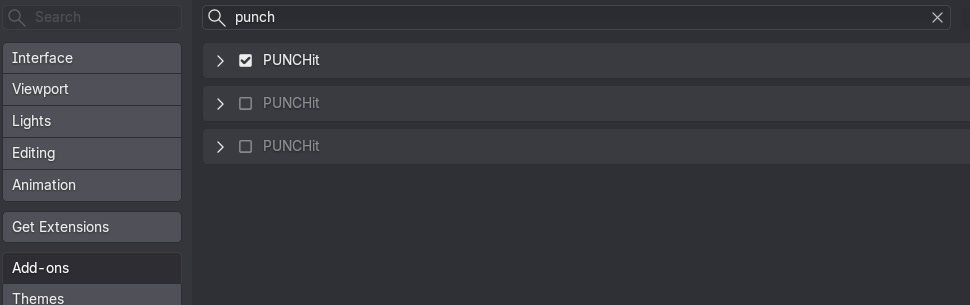 Multiple PUNCHit Installations from different locations at the same time
To prevent issues inevitably arising from multiple such parallel installations, HyperCursor will allow only one copy to actually activate.
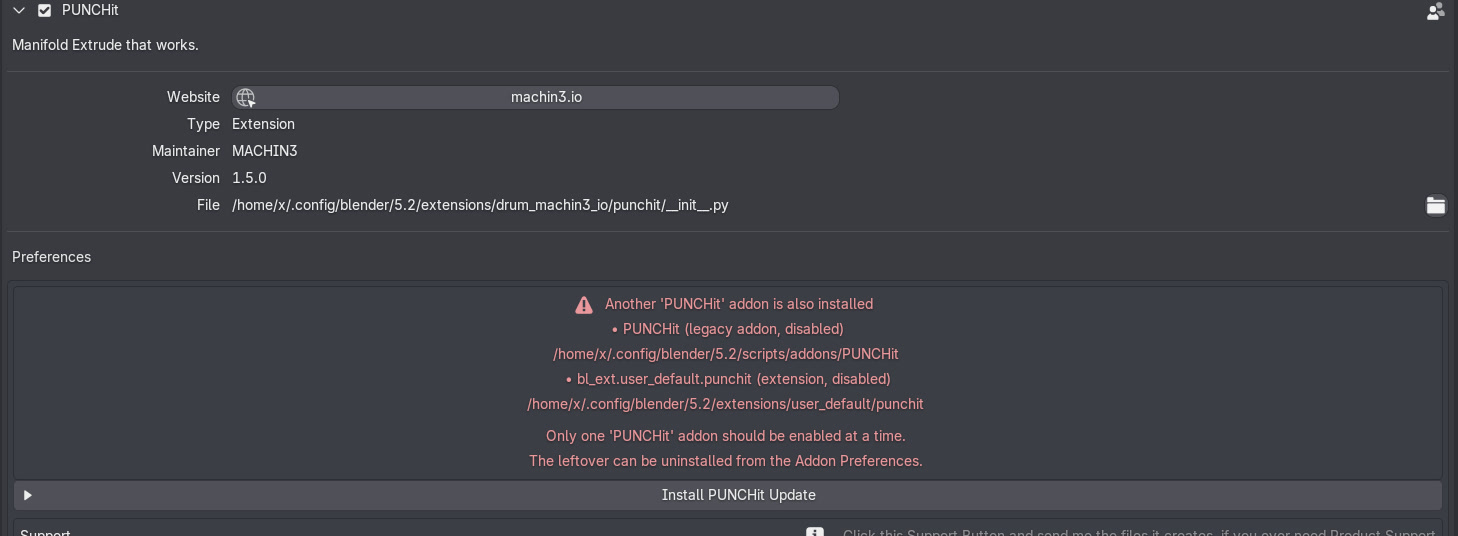 Only one copy will allow itself to activate, and point out if others are presentdemonstrated with PUNCHit here
Note
With multiple parallel installations, each additional one will stay installed, but disable automatically within 3 seconds, and so individual installations never fight each other. The active copy's addon prefs will notify you of this, and tell you to uninstall the leftover copies.
If you have a Legacy Addon copy enabled and then drop the .zip - or try to enable an extension copy - that new one will disable itself.
Deactivate or uninstall the leftover first, if you want the extension variant to stay enabled permanently. Same the other way around.
The Get Support tool also indicates whether the running copy is an extension or a legacy addon, and lists any leftover sibling installs.
Special Case: Blender on MacOS
MacOS users should install Blender properly, by following the official instructions.
Avoid running it just from the Downloads folder!
Note that, for dragging of files and folders, you need to hold down the COMMAND key.
This will ensure AppTranslocation1 is avoided.
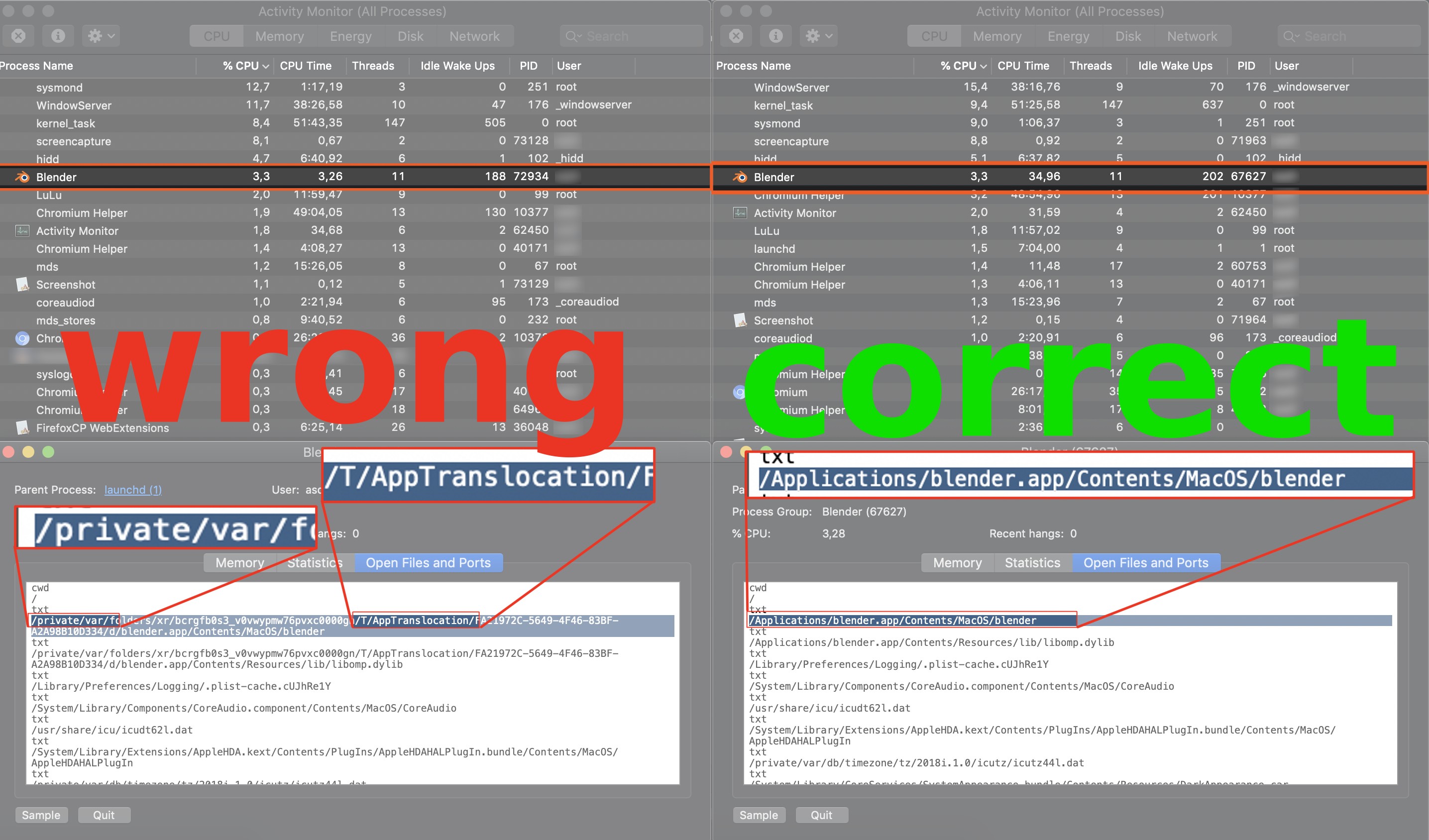
Furthermore, your download may not actually result in a .zip file, and instead extract automatically. This can and needs to be be changed in Safari settings.
Special Case: Blender on Arch Linux
Arch Linux users and users of other Arch based or similar rolling release distros are advised to use the official Blender builds.
The Blender package in the Community repository does not supply its own Python, and does not follow official recommendations.
As a consequence, your system's python version may not work properly with Blender and/or HyperCursor.
Note
Use the official tarball from blender.org to be on the safe side, it comes with a bundled Python and is the correct version that Blender addons are built against.
-
Learn more about AppTranslocation. ↩