Contents
Installation
How is INKit installed?
See the Installation guide for more details and do note the Blender version requirements and ensure that your system console and with that your Blender configuration are in order!
Note
If you want to run INKit on an older Blender version outside of the currently supported range, you can reach out to me via email and I'll supply an older addon version.
Does INKit work in Blender 5.3-alpha/beta?
Using experimental builds of Blender, you are at risk of encountering sudden failures of addons that used to work just fine the day before.
I can't make any guarantees that things will keep working. Fixing things that break in experimental Blender builds will not be a priority, until the experimental build approaches release.
Does INKit work on macOS?
Yes, 100%.
macOS users should install Blender properly, by following the official instructions.
Avoid running it just from the Downloads folder!
Note that, for dragging of files and folders, you need to hold down the COMMAND key.
This will ensure AppTranslocation1 is avoided.
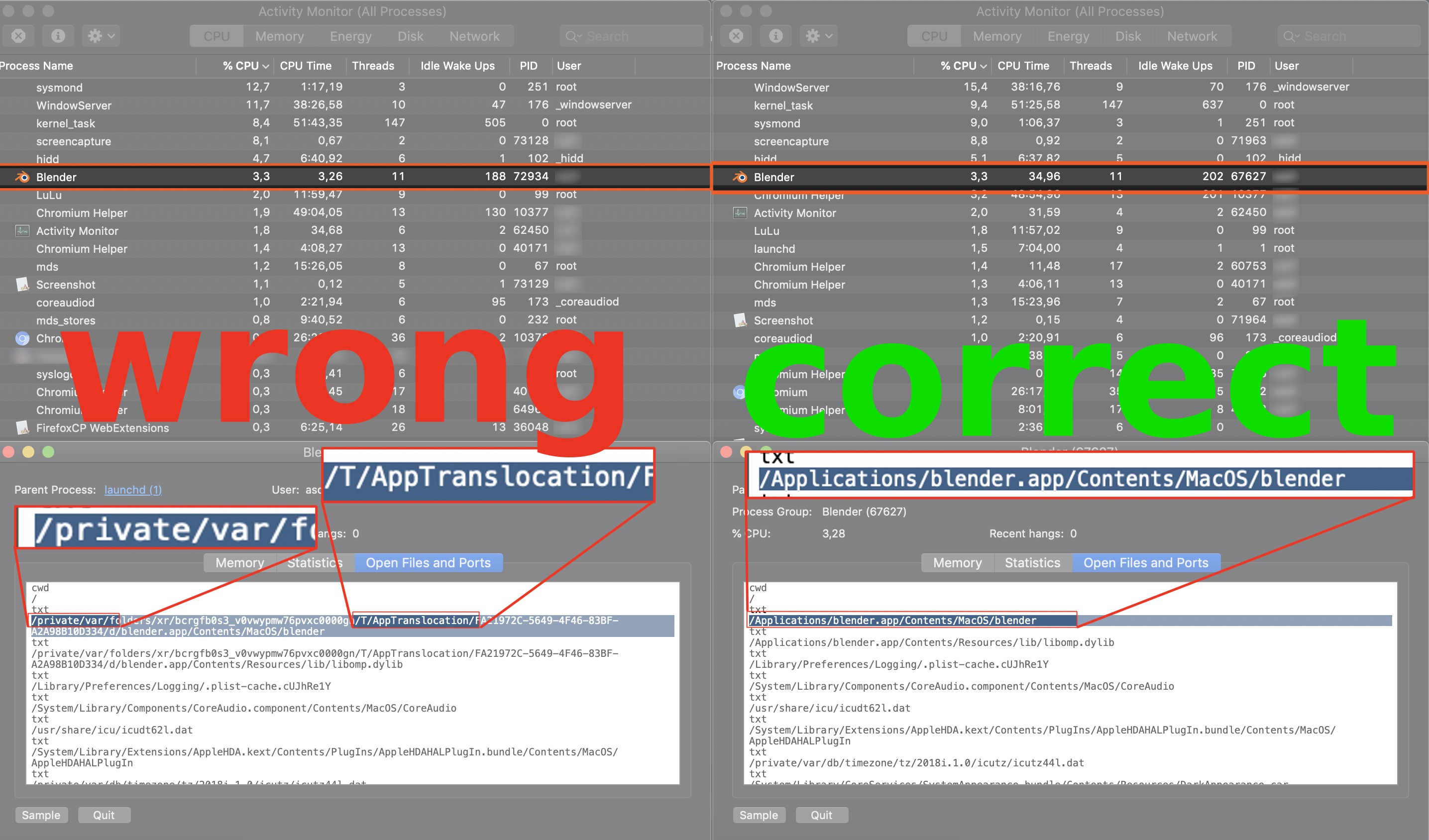
Furthermore, your download may not actually result in a .zip file, and instead extract automatically. This can and needs to be changed in Safari settings.
Does INKit work on Arch Linux?
Yes, 100%. In fact, I've never used Blender on anything but Linux myself.I don't use Arch btw
Arch Linux users and users of other Arch based or similar rolling release distros are advised to use the official Blender builds.
The Blender package in the Community repository does not supply its own Python, and does not follow official recommendations.
As a consequence, your system's Python version may not work properly with Blender and/or INKit or any other addons.
Note
Use the official tarball from blender.org to be on the safe side, it comes with a bundled Python and is the correct version that Blender addons are built against.
Get Support
Attention
Note the Requirements in the installation guide.
Make sure you are using the latest version.
Confirm you've followed the installation instructions.
General information
To provide help, I need the following:
- system-info.txt - as generated by the Get Support tool, shown in the video above
- system console output - as shown in the video below
- Purchase Receipt - as provided by Superhive or Gumroad
Keep in mind
Please do use the Get Support tool in the INKit panel of the MACHIN3 tab in the 3D view's sidebar or addon preferences to create the system-info.txt file, and for further instructions in the readme.html file.
Failed Installation
If your INKit installation fails, it's almost guaranteed that this is due to addon/Blender version mismatches, other faulty or version mismatched addons, system Python version mismatches or general Blender configuration issues, such as files in Blender's addon directory that shouldn't be there.
All of these can affect installation attempts of new addons and cause them to fail, as they often cause a cascade of errors.
None of this would be the fault of the new addon, but all of these would be obvious from the system console output.
If you encounter this and can't resolve these issues on your own, then it is essential to send me the entirety of the system console, not just a screenshot of the end. In fact the beginning is often more important in these cases.
Addon Error/Exception
If you are seeing an error/exception caused by INKit, please also send me the system console output, ideally copied in text form, not just a single screenshot of the error popup, as that may not cover sufficient context.
Keep in mind
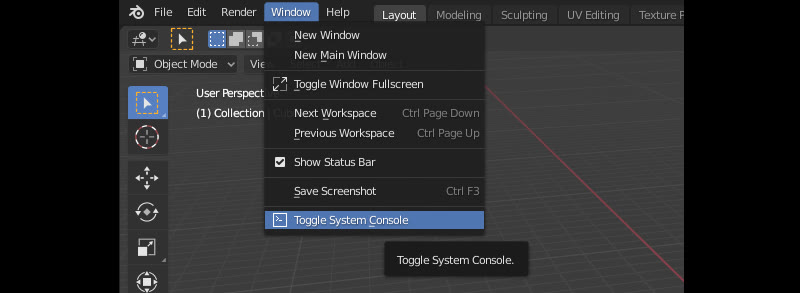
On Windows you can turn on the console from Windows > 'Toggle System Console'.
On Linux and macOS, you need to start Blender from a terminal.
I do not need an image of Blender's Info View and I don't need to see Blender's Python Console either.
.blend file to reproduce the issue
If an error only occurs in a specific .blend file or in a certain Blender context and you can reproduce it, please attach the blend file to your email as well.
Please remove any part of the model that doesn't contribute to the problem to keep the file size small.
Contact
Use eMail, not X, not Youtube, not Artstation, not Superhive messages, and not the Blender Artists thread for reporting of any issues or problems you have with the Addon.
Blender
What is the System Console?
INKit
Will my graphics tablet work?
Not in this initial release, no, at least not within Blender itself.
INKit 1.0 draws from a tablet computer: an iPad with Apple Pencil, or an Android tablet with an active stylus, while the device is on the same Wi-Fi as Blender.
A graphics tablet is a pen input device attached to the computer directly: a Wacom Intuos, a Cintiq, a Bamboo, etc.
From a developer perspective I was most intrigued by getting a tablet computer working with Blender. It already sits on my desk, but transferring Blender screenshots to it is just painful.
I don't have access to a graphics tablet right now, but even if I had, it requires a completely parallel drawing system anyway.
What you can do is connect to the INKit server as you would from an iPad or Android tablet.
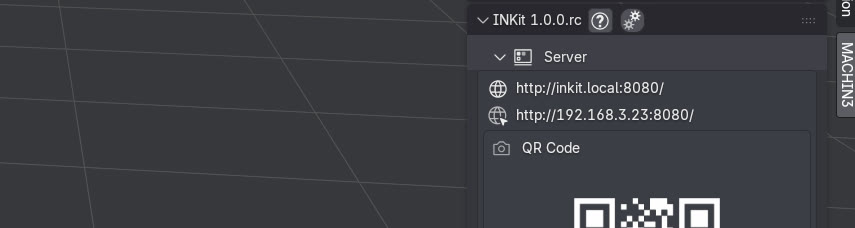 Click on either of these links - whichever is shown for you - to open INKit in your web browser
In your web browser, you should be able to sketch using your Wacom or similar.
Also, if you have a graphics tablet, you can already use Blender's own annotation tools, though not on an INKit canvas.
How soon 1.1 follows depends on how this first release goes, and on how it is received.
Missing or Unresponsive Strokes
Safari on the tablet can sometimes seem unresponsive to the pencil and any strokes you try to draw. You'll notice when your marks just don't appear. Pause for 2, 3 seconds then draw them again.
This is known as a Safari bug, and it is still open.
Sluggish Performance
My 8-year-old Samsung tablet is working very well with INKit, but its strokes can appear a bit sluggish, the longer they are or the longer I hold down the pen.
If you notice similar issues you can disable High Quality Strokes in the addon preferences.
Most likely you won't even notice a difference in quality, but you should notice a significant boost in performance.
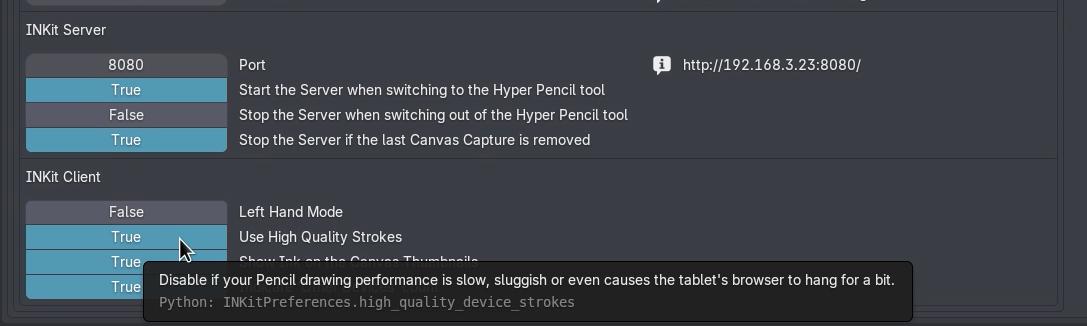 Disable "High Quality Strokes" in the addon preferences, if you notice weak performance
-
Learn more about AppTranslocation. ↩